
The php code is inside the <?php tag and does not required end tag i.e. ?> unless the php code is inside html tags
Anything outside of those tags would not be PHP and could be anything that you could normally write in an HTML file.
Make sure your files have the .php extension or else the server won’t process the code.
Example: <?php echo "I am awesome!";
Output :
I am awesome!
Explanation :
The command echo is one of the ways PHP can output content. So, basically we used the opening <?php tag to indicate that were starting to use PHP code. Then, we echo a string “I am awesome!”. end the statement with ;
Variables are containers (spaces in memory) that hold data. The data can be changed.
Variable Rules :
*Variable name must start with a $
*It must only contain alpha-numeric characters with the only exception of _ (an underscore)
*It must start with a alphabet or an underscore
*All variables are case sensitive, meaning that x and X are different variables
Example :
<?php
$myVar = “Greetings”;
echo $myVar;
Output :
Greetings
Explanation :
Create the variable $myVar with a value of the string “Greetings” and printing the value of the variable.
Naming your variables, functions and classes correctly is very important.
If you define the following variables:
$var1 = “PHP”;
$var2 = 15;
They won’t say much to anyone. But if you do it like this:
$programming_language = “PHP”;
$menu_items = 15;
$programming_language, for example is not a good name. It’s too long. A better name may be $prog_language, because it’s shorter but still understandable. Don’t forget to use comments as well, to mark what every variable does.
//The programming language used to write this script
$prog_language = “PHP”;
/*
The maximum number of items
allowed in your personal menu
*/
$menu_items = 15;
There are 6 groups of operators : arithmetic, assignment, increment/decrement, comparison, logical, and array operators.
Arithmetic Operators :
Operator Description
+ Addition
– Subtraction
* Multiplication
/ Division
% Modulus
Example :
<?php
$a = 3;
$b = 7;
//Addition with the “\n” being a line break
echo $a + $b . “\n”;
//Subtraction
echo $a – $b . “\n”;
//Multiplication
echo $a * $b . “\n”;
//Division
echo $a / $b . “\n”;
//Remainder or Modulus
echo $a % $b . “\n”;
Output :
10
-4
21
0.42857142857143
3
Assignment Operators :
The “=” is used to assign value to the variable.
Example :
<?php
$a = 3;
$a += $a;
echo $a . “\n”;
$b = 7;
$b *= $b;
echo $b;
Output :
6
49
Explanation :
The variable $a, is added to itself, which gives 6. The $b, is multiplied by itself, which gives 49.
Increment and Decrement Operators :
There are four possible outcomes from increments and decrements.
Example :
<?php
$a = 3;
$b = 3;
$c = 7;
$d = 7;
//adding 1 to $a before we echo
echo ++$a . “\n”;
//adding 1 to $b after we echo
echo $b++ . “\n”;
//subtracting 1 from $c before we echo
echo –$c . “\n”;
//subtracting 1 from $d after we echo
echo $d– . “\n”;
Output :
4
3
6
7
Explanation :
echo ++$a; increments the variable before we echo it out. However, echo $b++; don’t increment the variable until after it is printed on the screen.
The Comparison Operators in PHP are the following:
Serialization is a technique used by programmers to preserve their working data in a format that can later be restored to its previous form.
In simple cases this means converting a normal variable such as an array into a string and then storing it somewhere.
That data can then be unserialized and the programmer will be able to work with the array once again.
- It is mentioned here as one of the primary uses of serialization to store data on plain files when a database is not available.
An example of storing user details in a file so that they can be easily retrieved later. <?php /* This part of the script saves the data to a file */ $data = array( 'id' => 114, 'first name' => 'Foo', 'last name' => 'Bartholomew', 'age' => 21, 'country' => 'England' ); //Serializing data $string = serialize($data); $handle = fopen('data.dat', 'w'); fwrite($handle, $string); fclose($handle); /* Then, later on, we retrieve the data from the file and output it */ $string = file_get_contents('data.dat'); //Unserializing the data $data = unserialize($string); $output = ''; foreach($data as $key => $value) { $field = ucwords($key); $output .= "$field: $value\n"; } echo $output ?>
Output :
Id: 114
First Name: Foo
Last Name: Bartholomew
Age: 21
Country: England
Serialization is a technique used by programmers to preserve their working data in a format that can later be restored to its previous form.
In simple cases this means converting a normal variable such as an array into a string and then storing it somewhere.
That data can then be unserialized and the programmer will be able to work with the array once again.
- It is mentioned here as one of the primary uses of serialization to store data on plain files when a database is not available.
An example of storing user details in a file so that they can be easily retrieved later. <?php /* This part of the script saves the data to a file */ $data = array( 'id' => 114, 'first name' => 'Foo', 'last name' => 'Bartholomew', 'age' => 21, 'country' => 'England' ); //Serializing data $string = serialize($data); $handle = fopen('data.dat', 'w'); fwrite($handle, $string); fclose($handle); /* Then, later on, we retrieve the data from the file and output it */ $string = file_get_contents('data.dat'); //Unserializing the data $data = unserialize($string); $output = ''; foreach($data as $key => $value) { $field = ucwords($key); $output .= "$field: $value\n"; } echo $output ?>
Output :
Id: 114
First Name: Foo
Last Name: Bartholomew
Age: 21
Country: England
Serialization is a technique used by programmers to preserve their working data in a format that can later be restored to its previous form.
In simple cases this means converting a normal variable such as an array into a string and then storing it somewhere.
That data can then be unserialized and the programmer will be able to work with the array once again.
- It is mentioned here as one of the primary uses of serialization to store data on plain files when a database is not available.
An example of storing user details in a file so that they can be easily retrieved later. <?php /* This part of the script saves the data to a file */ $data = array( 'id' => 114, 'first name' => 'Foo', 'last name' => 'Bartholomew', 'age' => 21, 'country' => 'England' ); //Serializing data $string = serialize($data); $handle = fopen('data.dat', 'w'); fwrite($handle, $string); fclose($handle); /* Then, later on, we retrieve the data from the file and output it */ $string = file_get_contents('data.dat'); //Unserializing the data $data = unserialize($string); $output = ''; foreach($data as $key => $value) { $field = ucwords($key); $output .= "$field: $value\n"; } echo $output ?>
Output :
Id: 114
First Name: Foo
Last Name: Bartholomew
Age: 21
Country: England
<=> spaceship integer less than, equal to, or greater than zero when left side is respectively less than, equal to, or greater than right side (≥ PHP 7).
$a ?? $b ?? $c null coalescing first operand from left to right that exists and is not NULL. NULL, if no values are defined and that not NULL (≥ PHP 7)
Example :
<?php
$x = 7;
if($x===7)
{
//this would be . $x
}
if($x===”7″)
{
/*Since our variable $x is not a string this would be
not executed because === is a strict operator,
which makes sure that the variable is set to
the correct value and type of the
conditional variable.*/
}
if($x!=8)
{
/*this would be executed because != means that
the variable is not equal to the
conditional variable*/
}
if($x>8)
{
//Since 7 is not greater 8, this would not be executed
}
if($x<8)
{
//Since 8 greater 7, this would be executed
}
if($x>=7)
{
//Since 7 is equal 7, this would be executed
}
if($x<=6)
{
/*Since 7 is not less than or equal to 6
this would not be . executed*/
}
You can see what each one of the comparison operators do above, but what if you wanted to use two of them simultaneously? You can by using the following logical operators.
Example :
<?php
$x = 7;
if($x>=6 && $x<=8)
{
/*Since 7 is greater than 6 and 7 is less than 8,
this statement would be executed*/
}
if($x==7 || $x>=8)
{
/*This if statement says if $x is equal to 7 or
if x is greater than 8, then execute this statement.
While x is not greater than 8, $x is equal to 7;
therefore, it will execute the statement.*/
}
if(!($x==6))
{
/*Since $x is equal to 7, not 6, and
we are checking to see if its false
(with the ! before the condition),
this statement would be executed*/
}
The Logical operators are used in conditional expressions which return true or false.
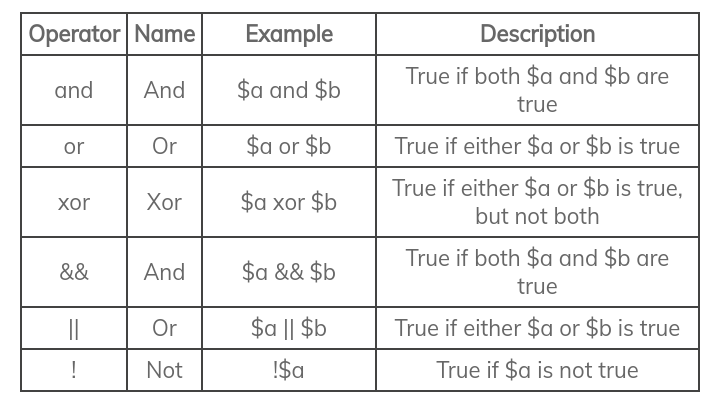
Example :
<?php
$x = 100;
$y = 80;
if ($x == 100 and $y == 50) {
echo “and operator \n”;
}
if ($x == 100 or $y == 80) {
echo “or operator \n”;
}
if ($x == 100 xor $y == 80) {
echo “xor operator \n”;
}
if ($x == 100 && $y == 50) {
echo “&& operator \n”;
}
if ($x == 100 || $y == 80) {
echo “|| operator \n”;
}
if ($x !== 90) {
echo “!= operator \n”;
}
Output :
or operator
|| operator
!= operator
The array operators are used to compare arrays:
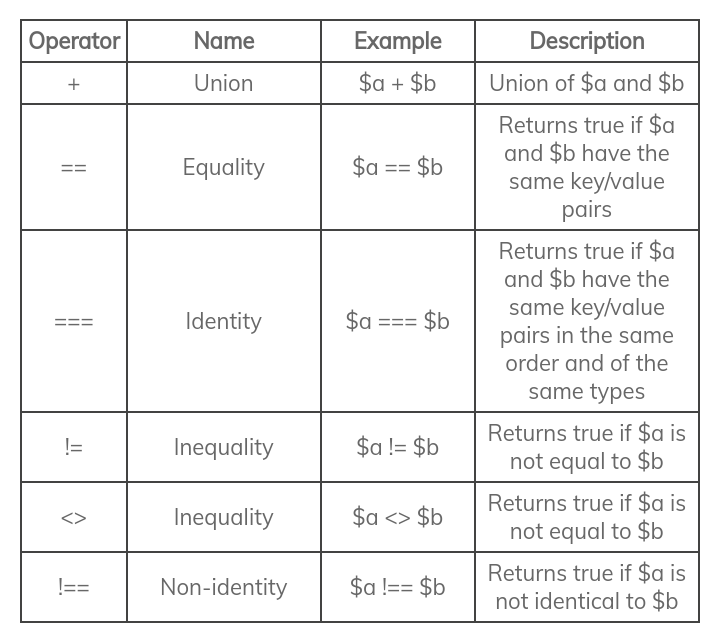
Example :
<?php
$x = array(
“a” => “king”,
“b” => “queen”
);
$y = array(
“c” => “prince”,
“d” => “princess”
);
// union
print_r($x + $y);
//Equality
var_dump($x == $y);
//Identity
var_dump($x === $y);
//Inequality
var_dump($x != $y);
//Inequality
var_dump($x <> $y);
//Non-identity
var_dump($x !== $y);
Output :
Array
(
[a] => king
[b] => queen
[c] => prince
[d] => princess
)
bool(false)
bool(false)
bool(true)
bool(true)
bool(true)
The concatenation operator (.), which joins together two strings, producing one string consisting of both parts
Example :
<?php
$string = “PHP is wonderful and great.”;
$string = $string . ” ” . “All the cool kids are doing it.”;
echo $string;
Output :
PHP is wonderful and great. All the cool kids are doing it.
The Newline Character (\n, \r\n or \r, based on the OS) to signify the end of the current line and the beginning of a new one.
\n for Linux/Unix-based systems.
\r\n for Windows.
\r for Mac.
Example :
<?php
echo “PHP is cool,\nawesome,\nand great.”;
Output :
PHP is cool,
awesome,
and great.
Explanation :
The line break occurs in the output wherever the \n occurs in the string in the echo statement.
If statements contain statements that are only executed, when the condition is satisfied.
Example :
<?php
$name = “Jon Snow”;
if($name == “Jon Snow”)
{
echo “It worked.”;
}
Output :
It worked.
Explanation :
The if statement simply says, if the variable $name is equal to “Jon Snow”, then execute the statements inside of the { } brackets. If our variable had any other value then the statements inside of the if would not have been executed.
if, else if, and else :
else if will execute only if the else if conditional expression evaluates to TRUE and if all conditions are FALSE then else will get executed
Example :
<?php
$marks = 65;
if($marks <= 100 and $marks>=75)
{
echo “Grade A”;
}
elseif ($marks < 75 and $marks >=60)
{
echo “Grade B”;
}
elseif ($marks < 60 and $marks >=45)
{
echo “Grade C”;
}
else
{
echo “Grade D”;
}
Output :
Grade B
If statement checks one condition, but switch statements can check for many different cases. The simple syntax of switch statements provide more readable code as opposed to using a lot of else if statements.
Syntax :
switch (n)
{
case label1:
code to be executed if n=label1;
break;
case label2:
code to be executed if n=label2;
break;
case label3:
code to be executed if n=label3;
break;
…
default:
code to be executed if n is different from all labels;
}
Example :
$x = 3;
switch($x)
{
case 1: //this statement is the same as if($x == 1)
echo ‘Case 1 was executed.’;
break;
case 2: //this statement is the same as if($x == 2)
echo ‘Case 2 was executed.’;
break;
case 3: //this statement is the same as if($x == 3)
echo ‘Case 3 was executed.’;
break;
case 4: //this statement is the same as if($x == 4)
echo ‘Case 4 was executed.’;
break;
default: /*this statement is the same as
if $x does not equal the other conditions*/
echo ‘Default was executed.’;
break;
}
Output :
Case 3 was executed.
Explanation :
break at the end of your case block to break out of the switch statement unless you want the following cases to be executed.
As for the default:, it means that if none of the other conditions are satisfied, do the statements following the default. The default term is comparable to the else statement.
The for loop is used when you know in advance how many times the script should run.
Syntax :
for (initialization; condition; increment/decrement)
{
//code to be executed;
}
Example :
<?php
//statement 1 var $i = 0; condition $i<5; statement2 $i++;
for($i = 0; $i < 5; $i++)
{
//write current value of variable $i
echo $i . “\n”;
}
echo “End of for loop “;
Output :
0
1
2
3
4
End of for loop
Explanation :
Inside of the for loop, we have the statement $i = 0; that declares a variable $i and sets it equal to 0. Next, we have the conditional $i < 5 that is the if part of the statement.
The condition says if $i < 5, then run the statements in the { }. Finally, we have an increment operator statement, $i++, which is used to advance a for loop.
Since the ++ is after the variable, we will increment i after all of the statements in the { } have been executed.
while loop is a control flow statement that allows code to be executed repeatedly based on a given boolean condition.
Syntax
while (condition)
{
//code to be executed;
}
Example :
<?php
$i = 0;
while($i < 5)
{
//write our variable’s value
echo $i . “\n”;
//increment operator
$i++;
}
echo “End of while loop”;
Output :
0
1
2
3
4
End of while loop
Explanation :
The first statement $i = 0; is simply setting our variable $i equal to zero. $i < 5 is the conditional statement. Finally, the increment operator, $i++ serves to advance the if like statement.
do-while loop always executes its block of code at least once. This is because the conditional statement is not checked until after the contained code has been executed.
Syntax
do{
//code to be executed;
} while (condition);
Example :
<?php
$i = 0;
do
{
//write our variable’s value
echo $i . “\n”;
//increment operator
$i++;
}while($i < 5);
echo “End of while loop”;
Output :
0
1
2
3
4
End of while loop
Explanation :
In the do while loop, the statements in the do while are always run once because the conditional is at the end.
The conditional here tells the server to go back and run through the do part again. We set the variable $i equal to 0. Then, we run through the do part where we find our increment operator $i++.
Once the increment operator makes $i equal to five, we exit the loop and continue reading onto the next statement, echo ” End of while loop “;.
foreach loop is a special form of the standard for loop. The foreach structure is a convenient way to loop through an array.
Syntax :
foreach ($array as $someVar)
{
echo ($someVar . “<br />”);
}
Another syntax of foreach loop :
Syntax :
foreach ($array as $key => $value)
{
echo ($key.” holds the value “.$value.”<br />”);
}
Example
foreach loops are useful when dealing with an array indexed with arbitrary keys (e.g. non-numeric ones):
<?php
$array = array(
“1st” => “My House”,
“2nd” => “My Car”,
“3rd” => “My Lab”
);
foreach ($array as $someVar)
{
echo $someVar . “\n”;
}
Output :
My House
My Car
My Lab
foreach with key values
If you need to use the array’s keys in the body of your loop, just add the variable as in the following statement. The phrase $myKey => $value makes the value of the key accessible:
Example :
<?php
$array = array(
“1st” => “My House”,
“2nd” => “My Car”,
“3rd” => “My Lab”
);
foreach ($array as $key => $value)
{
echo $key . “: ” . $value . “\n”;
}
Output :
1st: My House
2nd: My Car
3rd: My Lab
Update value of an array in foreach loop :
<?php
$array = array(
“1st” => “My House”,
“2nd” => “My Car”,
“3rd” => “My Lab”
);
foreach ($array as $key => $value)
{
// This will update the array
if($value == ‘My Lab’)
{
$array[$key] = ‘My Laboratory’;
}
}
foreach ($array as $value)
{
echo $value . “\n”;
}
Output :
My House
My Car
My Laboratory
The keyword break ends execution of the current for, foreach, while, do while or switch structure. When the keyword break executed inside a loop the control automatically passes to the first statement outside the loop.
When the keyword continue executed inside a loop the control automatically passes to the beginning of loop.
break
Example :
<?php
$i = 0;
for ($i = 0;$i <= 5;$i++)
{
if ($i==2)
{
break;
}
echo $i;
echo “\n”;
}
echo “End of for loop” ;
Output :
0
1
End of for loop
Explanation :
Once the var $i reaches 2 in the for loop, it meets the conditional statement $i == 2, which is then executed. The statement executed is break;. When break is executed it actually breaks us out of the for loop, which is why when $i equals 2 we exit the for loop and execute echo “End of for loop”; instead of ending the for loop when $i equals 5. Remember break escapes the entire logic of the other iterations.
continue
Example :
<?php
$i = 0;
for ($i = 0;$i <= 5;$i++)
{
if ($i==2)
{
continue;
}
echo $i;
echo “\n”;
}
echo “End of for loop” ;
Output :
0
1
3
4
5
End of for loop
Explanation :
It seems pretty obvious that continue is different than break. Notice how the only result not printed is 2.
The continue basically says let’s skip out of this particular instance of the loop and move onto the next one.
When we are running through the instance where $i becomes equal to 2, we meet the conditional statement if( $i == 2) where it is true.
Then, we execute the continue, which stops us from executing the following statements in the loop. We then run through the next iteration of the loop where $i equals 3.
Since we don’t meet the conditional statement this time, we write the following statements and will never enter into conditional if($i == 2).
An array is a variable, which can hold more than one value at a time
Arrays can store strings, integers, or even other arrays in a list type format.
Arrays can be accessed using index or key value and array index starts from 0
Arrays are often used whenever you have an unknown amount of variables that you need to store for retrieval later.
The key value of an array can be an implicit indexing system if you don’t provide the key.
How to define an array :
<?php
//defining an integer array
$numberList = array(1,3,7);
//Accessing the 0th element of the array
echo($numberList[0].”\n”);
//Accessing the 2nd element of the array
echo($numberList[2]);
Output :
1
7
The Dynamic Variable (Arrays) :
print_r : prints in human-readable format
Example 1 :
<?php
$numberList3 = array();
for($i = 0; $i < 10; $i++)
{
$numberList3[$i] = $i;
}
print_r($numberList3);
Output :
Array
(
[0] => 0
[1] => 1
[2] => 2
[3] => 3
[4] => 4
[5] => 5
[6] => 6
[7] => 7
[8] => 8
[9] => 9
)
Common PHP Array Functions :
Array functions are as follows :
1. array_pop() – removes the last element
Example :
<?php
$movies = array(“Inside Out”,”Stutterer”,”The Revenant”);
array_pop($movies);
print_r($movies);
Output :
Array
(
[0] => Inside Out
[1] => Stutterer
)
2. array_push() – adds element to the end
Example :
<?php
$names = array(“Yogesh”,”Timir”,”Avinash”);
array_push($names,”Nigel”);
print_r($names);
Output :
Array
(
[0] => Yogesh
[1] => Timir
[2] => Avinash
[3] => Nigel
)
3. array_search() – searches for value and returns its index
Example :
<?php
$movies = array(“Ratatouille”,”Spider-Man 2″,”The Aviator”);
echo array_search(“The Aviator”,$movies);
Output :
2
4. array_shift() – removes the first element and returns it
Example :
<?php
$dArray = array(“a”,”b”,”c”);
echo array_shift($dArray);
print_r($dArray);
Output :
aArray
(
[0] => b
[1] => c
)
5. array_slice() – returns selected elements
Example :
<?php
$movies = array(“Shrek”,”The Matrix”,”Tarzan”);
print_r(array_slice($movies,1,1));
Output :
Array
(
[0] => The Matrix
)
6. array_splice() – replaces specified elements with new
Example
<?php
$movies = array(“The Lion King”,”Jurassic Park”,”Aladdin”);
$newmovies = array(“Skyfall”,”Interstellar”,”Gravity”);
array_splice($movies,1,2,$newmovies);
print_r($movies);
Output :
Array
(
[0] => The Lion King
[1] => Skyfall
[2] => Interstellar
[3] => Gravity
)
7. array_unique() – removes duplicate values
Example
<?php
$hArray = array(“a”,”b”,”b”,”c”,”c”,”c”);
print_r(array_unique($hArray));
Output :
Array
(
[0] => a
[1] => b
[3] => c
)
8. array_unshift() – adds element to the beginning
Example
<?php
$iArray = array(“b”,”c”,”d”,);
array_unshift($iArray,”a”);
print_r($iArray);
Output :
Array
(
[0] => a
[1] => b
[2] => c
[3] => d
)
9. count() – returns number of elements in an array
Example
<?php
$jArray = array(“a”,”b”,”c”);
echo count($jArray);
Output :
3
10. sort() – sorts the array in ascending order
Example
<?php
$kArray = array(“c”,”b”,”a”,);
sort($kArray);
print_r($kArray);
Output :
Array
(
[0] => a
[1] => b
[2] => c
)
*Sort uses implementation of Quick Sort
PHP has a set of functions that retrieve input. If you are using standard input (such as that from a command-line), it is retrieved using the basic input functions:
Input to php from commandLine :
// opens standard input
$stdin = fopen(‘php://stdin’, ‘r’);
// reads until user presses ENTER
$line = fgets($stdin);
Single Line Comment :
Single line comment can be written using // or #
<?php
//echo “Single line comment using //”;
#echo “Single line comment using #”;
echo “I am really awesome!”;
Output :
I am really awesome!
The multi-line Comment :
<?php
/*
echo “I am awesome!”;
echo “I am really awesome!”;
*/
echo “I am super awesome!”;
Output :
I am super awesome!
Explanation :
The /* requires the closing tag of */. Everything in between these tags is completely ignored as PHP code.
Functions are extremely useful, and they can save you from writing bunch of redundant code.
A function is a block of statements, which is used to perform a specific task.
Creating a function :
function functionName()
{
// Code to be executed
}
Example of creating and calling a function :
<?php
//Defining a function
function greetings()
{
echo “Greetings”;
}
//Calling a function
greetings();
Output :
Greetings
Explanation :
Here, we have a function called greetings. After we define the function, we called the function with function_name greetings();.
Function with Arguments
Example 1 :
<?php
// $name is argument.
function welcomeMessage($name)
{
echo “Welcome to PHP Class “. $name;
}
welcomeMessage(“Ravneet”);
Output :
Welcome to PHP Class Ravneet
Explanation :
A argument is like a variable of the function that is defined when you call the function later.
Example 2 :
<?php
function addingFunction($argument1, $argument2)
{
echo $argument1 + $argument2;
}
addingFunction(333,444);
Output :
777
Explanation :
Call function addingFunction(). Pass in two argument this time: 333 and 444. Where 333 is being passed into the addingFunction as $argument1 and 444 is also passed in as $argument2. Once they are both passed in, we echo the sum of the two parameters. In the result, you can see that echo sent back 777.
Files Handling helps to process a file for different tasks.
Syntax to open a file :
//opens the file
$myFile = fopen(“filepath”,”mode of opening a file”) or exit();
Explanation :
We simply call fopen with our file location, which is sampleFile.txt, and then we specify the mode, which is r for read here. PHP just needs to know where the file is, the file’s name, and what we plan to do with it. Since I just have the file name, PHP assumes that the file is in the same directory as the file with this example code.
File Open Modes
There are 6 important modes in the file opening process :
r – read only from the beginning of the file
r+ – read and/or write only from the beginning of the file
w – clears file’s contents and writes to the file from the beginning (Creates a new file if it doesn’t exist)
w+ – clears file’s contents and read/write to the file from the beginning (Creates a new file if it doesn’t exist)
a – appends to file’s existing content (Creates a new file if it doesn’t exist)
a+ – appends to or reads file’s existing content (Creates a new file if it doesn’t exist)
**Every file that we open, we should always close it
Example 1 :
<?php
//opens the file
$myFile = fopen(“sampleFile.txt”,”r”) or exit();
//closes the file
fclose($myFile);
Explanation :
The fclose is our way to tell PHP we are done with the file and that it can be closed. It only has one parameter, which is the name of the file variable.
File Reading Example :
<?php
$myFile = “sampleFile.txt”;
$fh = fopen($myFile, ‘r’);
$myFileContents = fread($fh, 21);
fclose($fh);
echo $myFileContents;
Output :
I am the sample file.
Explanation :
Setting the file name with the $myFile set to “sampleFile.txt”. Then open the established link with the $myFileLink variable by setting the file name and what we want to do with the file (r for read).
Then move on to get the contents of the file with our variable $myFileContents.
Use the fread function, and pass in our variable link as the first parameter followed by the number of characters we want to read (in this case 21 characters). So it will simply read the first 21 characters of a file
PHP reads files similar to how you would. It starts with the beginning and proceeds through the file, so always remember you are starting from the beginning unless you tell it not to.
It will simply read the first 21 characters of a file
Reading the entire file
Example :
<?php
$myFile = “sampleFile.txt”;
$myFileLink = fopen($myFile, ‘r’);
$myFileContents = fread($myFileLink, filesize($myFile));
fclose($myFileLink);
echo $myFileContents;
Output :
I am the sample file…Back off me.
Explanation :
The main difference between this example and the previous one is the filesize function. The filesize function simply gets the size of the file, which means we can use it to tell us the number of characters that are in the file.
By inputting that function into the fread function we can tell PHP to read to the end of the file. You could also subtract from the filesize function if you wanted to leave off so many characters.
Example :
<?php
$myFile2 = “testFolder/sampleFile2.txt”;
$myFileLink2 = fopen($myFile2, ‘w+’) or die(“Can’t open file.”);
$newContents = “You wrote on me…”;
fwrite($myFileLink2, $newContents);
fclose($myFileLink2);
Explanation :
Remember that writing to a file will erase the previous content immediately. We set the variable $newContents to hold the content we want to write to the file. Finally, we use the fwrite function to write to our $newContents to our $myFileLink2. And of course, we close of file link like a good web developer that cares about his server.
Writing to the end of a file
We can write to the end of the file, known as appending. Using the previous example, you can simply change the w+ to an a. Append is exactly like write, but except it keeps the current contents and adds new contents to the end.
When writing code to work with files, always assume the worst. Assume the file doesn’t exist and you don’t have permission to read from/write to it. In most cases this means you have to tell the users that, in order for the script to work, they need to adjust those file permissions so that PHP can create files and read from/write to them, but it also means that your script can adjust and perform an alternative operation.
There are two main ways of error checking :
The @ operator to suppress any errors when working with the file and then checking, if the result is false or not
Functions like file_exists(), is_readable() and is_writeable()
Examples of using the ‘@’ operator :
<?php
$handle = @ fopen(‘data.txt’, ‘r’);
if(!$handle)
{
echo ‘PHP does not have permission to read this
file or the file in question doesn\’t exist.’;
}
else
{
$string = fread($handle, 64);
fclose($handle);
}
// The same applies for ‘a’
$handle = @ fopen(‘data.txt’, ‘w’);
if(!$handle)
{
echo ‘PHP either does not have permission
to write to this file or it does not have
permission to create this file in the
current directory.’;
}
else
{
fwrite($handle, ‘I can has content?’);
fclose($handle);
}
$handle = @ fopen(‘data.txt’, ‘x’);
if(!$handle)
{
echo ‘Either this file exists or PHP
does not have permission to create this
file in the current directory.’;
}
else
{
fwrite($handle, ‘I can has content?’);
fclose($handle);
}
?>
Explanation :
As you can see, the ‘@’ operator is used mainly when working with the fopen() function. It can also be used in other cases, but is generally less efficient.
Example of file_exists(), is_readable() and is_writeable() functions :
<?php
$file = ‘data.txt’;
if(!file_exists($file))
{
// No point in reading since there is no content
$contents = ”;
// But might want to create the file instead
// Still need to error-check
$handle = @ fopen($file, ‘x’);
if(!$handle)
{
echo ‘PHP does not have permission to create a
file in the current directory.’;
}
else
{
fwrite($handle, ‘Default data’);
fclose($handle);
}
}
else
{
/* The file does exist so we can try
to read its contents*/
if(is_readable($file))
{
$contents = file_get_contents($file);
}
else
{
echo ‘PHP does not have permission to read
that file.’;
}
}
if(file_exists($file) && is_writeable($file))
{
$handle = fopen($file, ‘w’);
fwrite($handle, ‘I can has content?’);
fclose($handle);
}
?>
*Error-checking makes your code very robust. It allows it to be prepared for most situations and behave accordingly, which is an essential aspect of any program or script.
Serialization is a technique used by programmers to preserve their working data in a format that can later be restored to its previous form.
In simple cases this means converting a normal variable such as an array into a string and then storing it somewhere.
That data can then be unserialized and the programmer will be able to work with the array once again.
It is mentioned here as one of the primary uses of serialization to store data on plain files when a database is not available.
An example of storing user details in a file so that they can be easily retrieved later.
<?php
/* This part of the script saves the data to a file */
$data = array(
‘id’ => 114,
‘first name’ => ‘Foo’,
‘last name’ => ‘Bartholomew’,
‘age’ => 21,
‘country’ => ‘England’
);
//Serializing data
$string = serialize($data);
$handle = fopen(‘data.dat’, ‘w’);
fwrite($handle, $string);
fclose($handle);
/* Then, later on, we retrieve the data from the file
and output it */
$string = file_get_contents(‘data.dat’);
//Unserializing the data
$data = unserialize($string);
$output = ”;
foreach($data as $key => $value)
{
$field = ucwords($key);
$output .= “$field: $value\n”;
}
echo $output
?>
Output :
Id: 114
First Name: Foo
Last Name: Bartholomew
Age: 21
Country: England


Leave a Reply